
Seedream 5.0 Pro: The AI Image Model You Can Edit
ByteDance's top-tier AI image generator for creators. Edit one element without redoing the whole image, control objects and backgrounds on separate layers, keep brands accurate with web search grounding, and let deep reasoning handle complex scenes.
From Generating to Editing
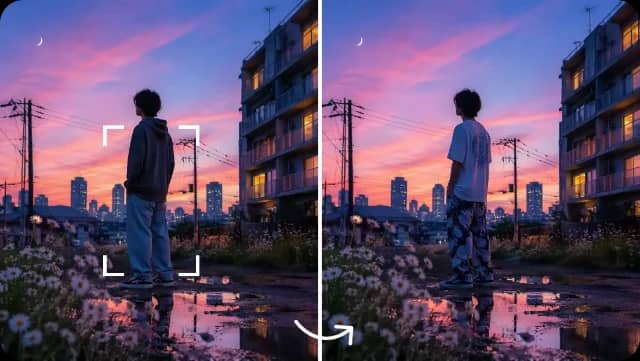
Pinpoint Precision Editing
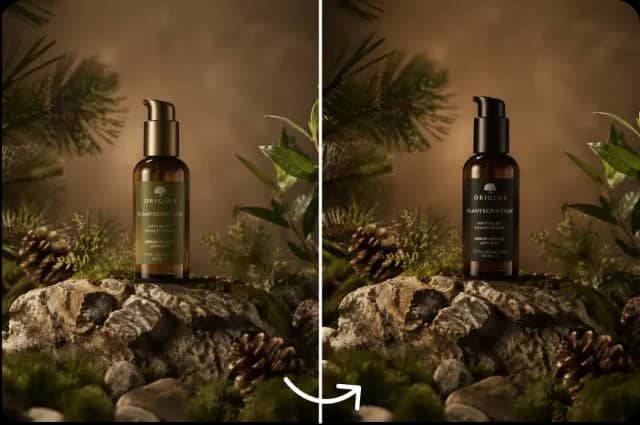
Select a single element and modify, replace, or refine it, while lighting, textures, shadows, and composition remain in place. Swap a color or a label on a product shot and keep the rest of the scene unchanged. Make targeted updates while preserving the original composition.
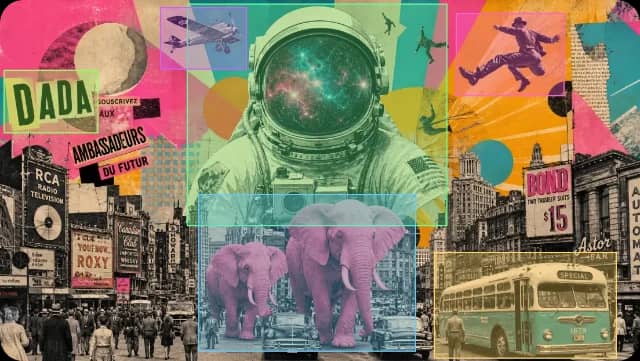
Multi-Layer Visual Control
Control objects, backgrounds, lighting, and effects individually, so complex compositions stay editable and detail is not flattened. Build a poster or a product scene part by part, then adjust one layer without disturbing the rest.
Web Search Grounding for Accurate Output
Seedream 5.0 Pro uses web search grounding to bring in current information when generating images, so brand-related, trending, and current-event prompts stay accurate and up to date. Real-time web context helps reduce factual errors in fact-sensitive visuals like product labels and news scenes.


Deep Reasoning for Smarter Composition
The model analyzes your prompt before rendering, organizing composition, lighting, depth, and spatial balance to match your intent. Complex prompts and multiple subjects come out coherent and cinematic, with fewer floating objects and broken layouts.
Character and Product Consistency
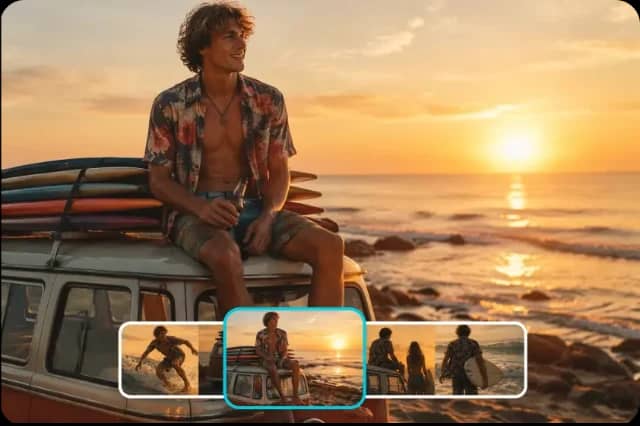
Add reference images to keep characters, mascots, and products recognizable across related images and edits. Pro helps maintain visual identity across a set, so a brand asset does not drift between variations. It works best with clear, high-quality references.
Images Ready for Marketing and Social Content
Clear, detailed results you can use across social posts, ads, and ecommerce listings. The same images can also serve as starting frames for video models like Seedance 2.5, carrying composition and style from still image to motion.
What You Can Create with Seedream 5.0 Pro

Commercial Product and Label Edits
Adjust colors, labels, and product details through text while keeping product identity, lighting, and realism stable. Useful for ecommerce listings and catalog concepts without a full reshoot.
Marketing and Brand Campaign Visuals
Design ad creatives, banners, and posters with layered composition and brand-aligned styling. Test directions fast and keep visual quality uniform across a campaign.
Posters and Infographics
Lean on deep reasoning and web grounding for dense, fact-sensitive layouts. Event posters, data infographics, and annotated visuals stay accurate and well organized.
Ecommerce and Product Reveal Images
Place a product in different settings, swap backgrounds, and generate lifestyle scenes while the product look stays recognizable across every channel.
Social Media Creatives
Produce on-brand posts and story visuals quickly, then refine individual elements as your ideas evolve rather than starting over.
Starting Frames for AI Video
Generate detailed images that can serve as starting frames for video models like Seedance 2.5, preserving composition and visual style as content moves from still to motion. On AIEffect, image and video sit in one workspace.
Who Seedream 5.0 Pro Is For

Ecommerce and Product Teams
Edit product photos, swap labels, and generate lifestyle scenes without a shoot, while keeping the product look recognizable across listings and channels.
Marketers and Ad Teams
Build brand-safe creatives with a unified look across a campaign, test directions fast, and refine the winner with pinpoint edits rather than full regenerations.
Brand Designers
Produce posters, infographics, and brand materials where accuracy matters. Web grounding keeps brands and current events right, and multi-layer control keeps complex layouts editable.
Social Media Creators
Create on-brand posts and story visuals, then refine individual elements as your ideas evolve without redoing the whole image.
Create Your First Image in 3 Steps
Pick Seedream 5.0 Pro and Add References
Open AIEffect, choose Seedream 5.0 Pro, and upload reference images or start from a text prompt. References help the model keep your subject, style, and brand aligned.
Describe or Direct Your Edit
Write a prompt for the scene, or select an element to change. Ask for a color swap, a new background, or a label fix, and the model edits just that part while keeping the rest intact.
Generate, Refine, and Export
Get your image, use pinpoint editing to fix specific areas, then export for social, web, or your next project.
All-in-One AI Creator for Images & Videos
Create images and videos from text, images, or clips with leading AI models. No subscription — just pay as you go with credits that never expire.
 GPT Image 2.0
 GPT Image 1.5
 Nano Banana 2.1Nano Banana 2Nano Banana 2 Lite
 Nano Banana Pro
 Veo 3.1Gemini Omni
 Seedance 2.5Seedance 2.0Seedance 2.0 Mini
 Seedream 5 LiteSeedream 5 Pro
 Seedance 1.5 Pro
 Grok Imagine 2.0Grok Imagine 1.5Grok Imagine
 Qwen2Qwen3
 Hailuo 2.3Minimax H3
 Kling 3.0Kling 2.6Kling O3
 Happyhorse 1.0Happyhorse 1.1
 Midjourney V8.2Midjourney V8.1Midjourney V7
 Pixverse v6
 Flux 2 ProFlux 3 VideoFlux 3 Image
 Mai Image 2.6
Frequently Asked Questions
It is the highest tier of ByteDance's Seedream image family, built for professional image generation and editing. It combines pinpoint element editing, multi-layer visual control, web search grounding, and deep-reasoning composition in one model.
Pro offers greater visual refinement, deeper reasoning, and stronger prompt understanding than Lite, with more cinematic, structured, and polished output. It handles complex prompts and multiple subjects better, and focuses on high-fidelity editing and layered composition. Lite prioritizes speed and cost efficiency for quicker work.
Yes. Pinpoint editing works like a focused AI photo editor: select a single element and modify, replace, or refine it, such as a color, label, or object, through text, while lighting and composition remain in place. You do not need to regenerate the whole image.
It lets you control objects, backgrounds, lighting, and effects individually, so complex compositions stay editable. Adjust one layer without disturbing the rest, which is useful for posters, ads, and product scenes built part by part.
The model uses web search grounding to bring in current information during generation, so real-world subjects, brands, products, and trending topics stay accurate and current. This helps reduce factual errors in fact-sensitive visuals.
The model analyzes your prompt before rendering, organizing composition, lighting, depth, and spatial balance to match your intent. Complex prompts and multiple subjects come out more coherent, with fewer floating objects and broken layouts.
Each model is known for a different strength. Nano Banana Pro is popular for fast generation and realistic visuals. GPT Image is known for strong text rendering and multilingual typography. Midjourney is popular for distinctive artistic styles. Seedream 5.0 Pro is built for precise editing, multi-layer control, web-grounded accuracy, and deep reasoning on complex, fact-sensitive compositions. On AIEffect you can run several in one workspace and pick the winner per project.
No download needed. Seedream 5.0 Pro runs in your browser on AIEffect and can support commercial creative workflows such as marketing visuals and ecommerce content. Always check your plan's licensing terms before publishing, and avoid generating trademarks or characters you do not own rights to.
Start Creating with Seedream 5.0 Pro
Turn prompts and references into editable images with pinpoint editing, multi-layer control, web grounding, and deep reasoning.